


HOLLA - Video Call
4.227.02K Reviews
App Specs
- Version
- 9.17.0
- Updated On
- License
- Free
- Downloads
- 10,000,000+
- Developer
- HOLLA Group
- Categories
- Social
- Platform
- Android
Screenshots
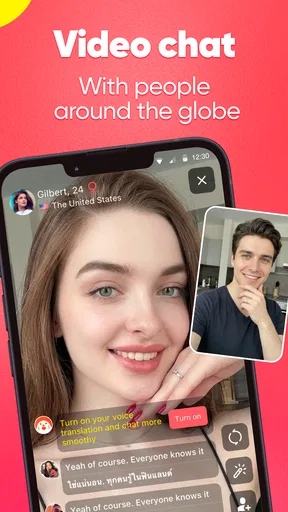
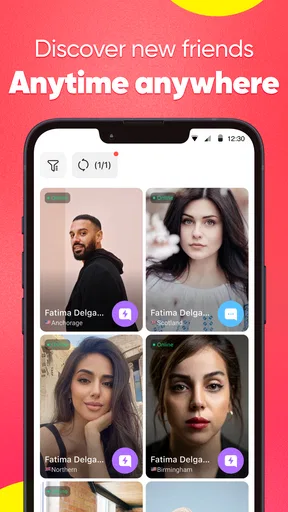
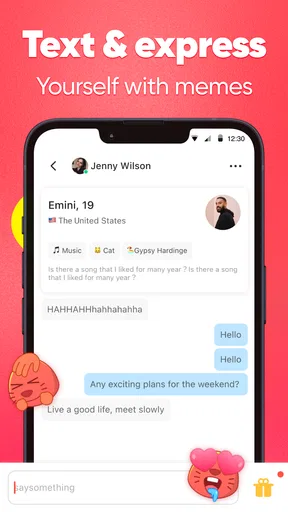
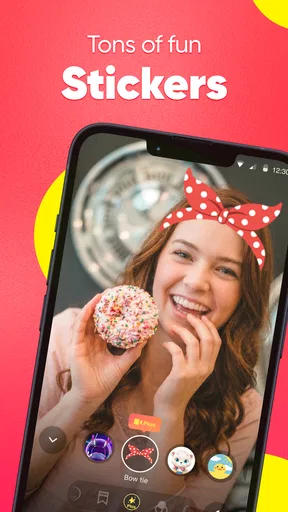
 Analysis by AppCompare
I approached HOLLA - Video Call as a newcomer would: install it, understand what the first screen is asking me to do, and see whether it can lead to a comfortable conversation rather than just a quick swipe through strangers. It is a social app from HOLLA Group built around video chats with people who share your interests. The idea is immediate and personal, but that also means the experience depends heavily on your boundaries, your connection, and the kind of interaction you want.
My overall impression is that HOLLA works best when you treat it as a casual way to meet someone new, not as a replacement for a private messaging app or a carefully managed community. The app is free to install, carries a Mature 17+ rating, and includes optional purchases ranging from $0.49 to $99.99 per item. That combination makes it accessible, but it also means a first-time user should take a moment to understand the social setting before starting a call.
What the first session on HOLLA feels like
The first thing to know is that this is not a traditional social network where you spend most of your time building a profile, reading a feed, or waiting for replies. Its central appeal is the possibility of a direct video interaction. That makes the app feel more spontaneous than services where you exchange messages for hours before deciding whether to talk.
That spontaneity can be refreshing. If you are bored during a break, curious about meeting people outside your usual circle, or interested in conversations connected to your hobbies, the format removes much of the delay. You do not need to write a perfect opening message or maintain a public timeline. You can focus on the person in front of you and decide quickly whether the conversation feels worthwhile.
It can also be more demanding than ordinary social apps. A video call exposes your face, voice, surroundings, and immediate mood. Someone who enjoys live interaction may find that energizing, while a person who prefers time to think before answering may feel rushed. I would not recommend opening the app for the first time when you are already uncomfortable with being seen or heard by someone you do not know.
The audience size helps explain why the service can feel active. HOLLA has passed 10 million installs, and its average rating is 4.2 from roughly 457,000 ratings. Those figures suggest a well-established app rather than a small experiment, but they should not be read as a promise that every conversation will be interesting. A large pool creates variety; it does not remove the need to choose carefully.
The age label matters here. Mature 17+ is not a minor detail to skip during setup. This is a service for older teens and adults who understand the risks of live contact with strangers. I would especially encourage younger users to involve a trusted adult before using any social video service, and I would advise everyone to avoid sharing a school, workplace, home address, phone number, or other identifying detail during an early conversation.
Worth Reading Before You Choose

EA SPORTS FC Mobile 26 Is a Bigger Football Game, but It Takes Time

Flipboard Shows What News Apps Must Do Beyond the Feed

Switching to Android Auto Means Rethinking Your Driving Routine

Google Calendar Makes a Crowded Week Easier to Manage

Ludo King Makes the Most of the Minutes Between Plans

Baby Panda World Brings Quick Play to Modern Phones, but Its Game Library Feels Busy
Who will probably enjoy it
I can see HOLLA appealing to outgoing users who like short, unscripted conversations. It may also suit people who have moved to a new city, want to practice being more conversational, or simply prefer speaking over composing messages. Someone who finds text-based matching repetitive may appreciate the faster sense of whether a connection has any energy.
It is less suitable for users seeking a quiet, private space for close friends. If your main goal is reliable group communication, a familiar messenger or a private video-calling service is the better choice. Those alternatives usually give you more control over who joins and when the conversation happens. HOLLA is built around discovery, so uncertainty is part of the experience rather than an occasional exception.
Setting it up without rushing
HOLLA supports devices running Android 8.0 or later, which makes it available to many older phones as well as current models. I would still begin with a stable connection and a place where you can speak comfortably. A weak network can make a first call feel awkward when the real problem is choppy video or delayed audio.
Before you start, choose a simple presentation that does not reveal more than you intend. A neutral background is useful, not because the app requires a polished appearance, but because it prevents accidental clues about where you live or spend time. I also prefer headphones when possible: they reduce echo and make it easier to hear a new contact without turning the conversation into something everyone nearby can follow.
Give yourself a minute to check the camera angle and microphone. The most useful test is not a perfect selfie; it is confirming that your face is visible, your voice is understandable, and you can end the interaction without fumbling. That small preparation makes it easier to concentrate on the person rather than on whether the phone is working.
The developer, HOLLA Group, has kept the concept straightforward enough for a first session, but the social decisions remain yours. I would not rush through any screen that relates to discovery, contact, or purchases. The app is free, yet optional in-app items can cost as much as $99.99 per item. If you are only exploring, treat every purchase prompt as something to review later rather than a necessary step toward meeting someone.
How to reach a first meaningful conversation
A successful first action is not merely connecting to another camera. For me, it is staying in a conversation long enough to establish whether both people are comfortable. I would begin with a neutral greeting and one easy question about an interest, a hobby, or what brought the person to the app. That is more useful than trying to be impressive, and it gives the other person a natural way to respond.
Keep the opening short. A question such as “What kind of things do you usually talk about here?” lets you learn how the other person uses the service without revealing private information about yourself. If the answer is respectful and specific, you have a starting point. If the response immediately pressures you, asks for personal details, or makes you uncomfortable, ending the interaction is the correct outcome, not a failed one.
This is one of the less obvious adjustments new users need: success on a discovery-based video app is partly measured by how well you filter. You are not obligated to turn every connection into a friendship. A brief, polite exit can save time and protect your mood. I would rather leave a dull or uncomfortable call quickly than stay because I feel responsible for entertaining a stranger.
For a realistic everyday use case, imagine having twenty minutes between errands. Instead of opening a feed and scrolling without speaking to anyone, you could use HOLLA for a few short conversations about music, travel, language, or another interest. The useful workflow is to set a personal time limit, keep the first topic light, and stop while the experience still feels positive. That prevents a casual break from becoming an exhausting string of calls.
Where new users often get confused
The biggest possible misunderstanding is assuming that a shared interest guarantees a shared communication style. It does not. Two people may both enjoy the same subject and still have very different expectations about humor, privacy, or how quickly a conversation should become personal. Interest is an opening, not proof of trust.
Another point of confusion is the difference between a free download and a completely purchase-free experience. HOLLA is free to use in the sense that you can install it without paying, but it offers in-app purchases from $0.49 to $99.99 per item. I recommend deciding in advance whether you want to spend anything. If you do not, avoid treating a locked or promoted option as something you must buy to make the app worthwhile.
The mature age rating should also shape your expectations. Live video can expose you to behavior or topics that are more intense than what you would encounter in a general-audience messaging app. If a call crosses a line, do not debate the person or try to correct them. End the interaction, use the app’s available safety controls, and move on. Your attention is not a resource a stranger is entitled to.
Privacy is another area where users can make preventable mistakes. Do not show documents, screens, mail, uniforms, house numbers, or distinctive views through the camera. Avoid moving the conversation to another service simply because someone asks. A person who is genuinely interested in talking can respect a reasonable boundary. Pressure to switch platforms, send money, or provide contact details is a strong reason to disengage.
You may also wonder whether HOLLA is suitable for serious relationships. It can introduce you to people, but I would not treat an initial video chat as evidence of identity, compatibility, or good intentions. If a conversation becomes promising, take it slowly. Keep personal details limited, look for consistent respectful behavior over time, and do not let excitement override ordinary caution.
Making the app work better for your habits
One practical technique is to prepare three conversation themes before opening the app. I would choose one interest-based question, one light everyday topic, and one easy closing phrase. This prevents the first silence from feeling like a crisis and keeps the interaction from becoming an interview. It also helps users who are curious about video chat but do not naturally improvise with strangers.
A second useful habit is to separate curiosity from commitment. You can be interested in someone’s story without giving them access to your private life. Talk about broad preferences instead of exact routines, locations, or plans. This lets you test the quality of the conversation while keeping control of what the other person learns.
A third trade-off concerns spontaneity. The less preparation you do, the more unpredictable the calls may feel. That is part of HOLLA’s charm, but it can become tiring. I get more from the app when I use it during a defined window and stop after a few interactions, rather than leaving it open indefinitely. The goal is a handful of genuine exchanges, not maximum screen time.
For users who are shy, the best first step may be observation and a very short conversation rather than trying to create an immediate friendship. Speak clearly, ask one question, and give yourself permission to leave. Confidence tends to improve when the first session has a manageable purpose. You do not need to perform a personality that is not yours.
For users who are highly social, the limitation is different: it can be easy to mistake rapid access to people for meaningful connection. If you find yourself repeating the same introduction without listening, take a break. The app is more rewarding when you use the video format to notice real conversational compatibility, not just to collect brief encounters.
How it compares with familiar alternatives
Compared with ordinary messaging apps, HOLLA reduces the distance between matching and speaking. A messenger is usually better when you already know the person, need dependable group coordination, or want a written record of plans. HOLLA is more appealing when discovery and immediate face-to-face contact are the point.
Compared with social feeds, it offers less passive browsing and more direct participation. A feed lets you control when you respond and gives you time to shape your public presence. HOLLA asks you to make a quicker judgment in a live setting. That can feel more authentic, but it also leaves less room to edit your words or recover from an awkward opening.
Compared with private video services, the advantage is the possibility of meeting people beyond your existing contacts. The disadvantage is that you cannot assume the same level of familiarity or control. I would choose a private service for family, work, appointments, or sensitive conversations, and reserve HOLLA for low-stakes social discovery.
That distinction is important because no single app is best for every kind of video communication. HOLLA’s strength is immediacy. Its weakness is that immediacy brings unpredictability. If you want a curated professional network, a moderated interest group, or a guaranteed conversation with someone you already trust, another category of service will fit better.
Performance, cost, and long-term value
The current version is 9.17.0, and the app has been available since July 12, 2016. That history gives it the feel of an established social product rather than a brand-new experiment. Still, longevity does not remove the basic realities of live video: your experience will vary with the quality of your connection, the people you encounter, and how carefully you manage your time.
The rating picture is encouraging without being a guarantee. HOLLA has around 27,000 written reviews alongside its broader rating total, so there is a substantial user history behind the app. I would use that as a reason to try it thoughtfully, not as a reason to ignore the mature audience, purchase options, or need for personal boundaries.
Its free entry point is a genuine advantage for experimenting. You can decide whether spontaneous video conversations suit you before committing money. The trade-off is that optional purchases may complicate the experience for users who dislike virtual goods, paid boosts, or any design that encourages spending during a social session. My advice is simple: explore first, purchase only with a clear reason, and never spend to keep a stranger interested.
My recommendation after using it as a newcomer
I would recommend HOLLA to an adult or mature older teen who wants low-pressure opportunities to speak with new people and is comfortable making quick decisions about boundaries. The app can turn a quiet moment into a real conversation, and its video-first approach feels more immediate than endlessly exchanging text.
I would skip it if you are looking for guaranteed privacy, carefully selected contacts, professional communication, or a calm environment for close relationships. I would also avoid it if live interaction with strangers makes you anxious enough that the app would feel like work. In those cases, a private messenger, a moderated community, or a conventional video-call tool is likely to be more satisfying.
My best advice for a first session is to keep the goal modest: check your setup, start with one safe interest-based question, and treat ending an uncomfortable call as good judgment. Do not share identifying details, do not feel pressured to buy anything, and do not confuse a quick connection with trust.
Used with that mindset, HOLLA - Video Call is a lively social option rather than a promise of instant friendship. I like its directness, especially when I want conversation instead of another scrolling session, but I also think its value depends on disciplined use. If you want to meet people spontaneously and can protect your time, privacy, and budget, it is worth trying. If you need predictability above all else, choose a more controlled alternative.
Pros
- Quick matching makes it easy to meet new people worldwide.
- Video and voice calls support more natural conversations than text chat.
- User profiles help you decide whom to connect with before starting a call.
- In-app reporting tools let you flag inappropriate behavior quickly.
- The app offers a lively experience for users seeking spontaneous conversations.
Cons
- Random encounters can lead to awkward or uncomfortable conversations.
- Some useful features may require coins or additional in-app purchases.
- Connection quality depends heavily on both users’ internet speeds.
- Public video interactions may raise privacy concerns for cautious users.
- The user base and activity level can vary depending on your location and time.
FAQs for HOLLA - Video Call
What is HOLLA - Video Call and how does it work?
HOLLA - Video Call is a social video-chat app designed to connect users with people around the world through live, face-to-face conversations. After creating an account, you can enter matching sessions and interact with other users using video, voice, and text features. The experience is fast and spontaneous, so the people you meet may vary each time.
Is HOLLA - Video Call free to download and use?
HOLLA - Video Call can generally be downloaded for free on supported mobile devices, and some basic features may be available without payment. However, the app may include optional in-app purchases, virtual items, subscriptions, or other premium functions. Before confirming a purchase, check the current pricing, renewal terms, and payment details shown in the App Store or Google Play.
Is HOLLA - Video Call safe for teenagers and children?
HOLLA - Video Call should be used carefully because it connects you with strangers, and conversations may include inappropriate language, behavior, or content. Parents should review the app’s age rating and privacy settings before allowing access. Younger users should not use random video-chat services without close supervision, and personal information should never be shared with people met online.
What privacy and safety controls are available in HOLLA - Video Call?
When using HOLLA - Video Call, avoid revealing your full name, address, school, workplace, phone number, passwords, or financial information. If another user behaves inappropriately, use the available block or report tools and end the conversation. Review the app’s permissions and privacy policy, especially access to the camera, microphone, contacts, and account information, before continuing.
What should I do if HOLLA - Video Call has connection or video problems?
Video-chat quality depends heavily on your internet connection, device performance, and camera or microphone permissions. If calls fail or the video is unstable, switch between Wi-Fi and mobile data, close other apps, restart HOLLA, and confirm that camera and microphone access is enabled. Keeping the app and your operating system updated can also help resolve compatibility issues.


